Anand Software and Training is pleased to announce the availability of their LearnSoftMax system via SaaS. The application may be tried using demo mode by going to the web page, https://www.simexams.com/laasweb/laas-login.htm
The SaaS version complements our desktop and mobile versions of LearnSoftMax by allowing users to access the software via the browser from anywhere using any device supporting any major browsers.
The SaaS model supports LearnSoftMax Lite, which doesn’t include author section. For authoring the content, one should use the desktop version of the software, given at https://www.simexams.com/products/laas/learning-assessment-software.html
With this update, the LMS software is available on all widely used platforms, including Windows, Mac, iOS, and Android.
Anandsoft.com’s Learning and Assessment System (LAAS) is a comprehensive software platform designed to help educational institutions and corporate organizations create, deliver, and manage online learning and assessment programs.
Checkout this video for a detailed list of features:
LAAS provides a range of features and tools to facilitate interactive, engaging, and effective learning experiences, including:
Course authoring: LAAS allows educators to create interactive, multimedia-rich online courses, complete with videos, images, audio, quizzes, and assignments, using a user-friendly drag-and-drop interface.
2. Assessment tools: LAAS provides a variety of assessment tools, including multiple-choice, fill-in-the-blank, true/false, and matching questions, as well as essay and short-answer questions. Assessments can be timed or untimed, and the system can be configured to provide automatic grading or manual grading.
3. Learning management: LAAS offers a complete learning management system (LMS), which includes features such as student registration and enrollment, course scheduling and tracking, progress reporting, and certificate generation.
4. Tools: LAAS includes a range of collaboration tools, including discussion forums, and chat rooms, allowing students and instructors to engage in real-time collaboration and communication.
5. Reporting and analytics: LAAS provides detailed reports and analytics, allowing instructors to track student progress, identify strengths and weaknesses, and adjust their teaching approach accordingly.
6. Mobile compatibility: LAAS is mobile-compatible, allowing students and instructors to access the platform and participate in courses and assessments from anywhere, at any time, using their smartphones or tablets.
Summary: Anandsoft.com’s Learning and Assessment System is a comprehensive and user-friendly platform designed to help educational institutions and corporate organizations create, deliver, and manage online learning and assessment programs. With its course authoring, assessment tools, learning management, collaboration tools, reporting and analytics, and mobile compatibility features, LAAS provides a valuable resource for individuals seeking to improve their knowledge and skills in a flexible, interactive, and engaging online learning environment.
Simexams.com recently updated it’s Computer Based Test software to support remote proctoring. Remote proctoring enables candidates to write an exam from the comfort of home or any location with network access to user’s computer. It enables organizations to conduct an exam remotely and observe the candidate for any fraud or cheating during the exam.
The software includes several features, including Online/Offline mode (in off-line mode, remote proctoring is not supported), exam configuration, authoring, and centralized reporting and exam delivery.
Unlike most of the CBT softwares which work from browser window, the simexams.com software uses client software and server software (Client-Server/Peer model). The advantages of using installable software include betteer security, endurance against short Internet connectivity problems, and storage of results in local database in addition to server side storage. It also solves the frequent problems encountered with browser incompatibility.
Simexams.com, leading Computer Based Test Software provider, recently released another version of its software to support organizations. With this update, we are now offering organization licensing of the software. Organizations can install the software on their own server and offer exams to candidates in a seamless environment, with complete customization of the logos, and reports.
The important features of the software are given below”
Exam mode – Simulates an exam environment in which candidate needs to answer exam created by instructor. Options such as reviewing the answers, hint cards may be enabled or disabled.
Learn mode – Provides interactive learning environment where candidate can go through each question and view explanations.
Review mode – At end of every exam, you can save results for that exam for future viewing. In review mode you can view saved exams with answers selected by candidate along with correct answer and detailed explanation for each question (if provided by author).
Detailed stats are available that includes number of questions attempted, correct and wrong answers, and time taken for each question. You may download the trial version of the software by going to the product page:
Simulationexams.com, leading practice tests and lab sims provider, released CCNA practice tests conforming to the latest exam objectives, 200-301. The previous version of the exam 200-125 retired on 24th Feb 2020 and the current exam became live on 24th Feb 2020. The exam topics for the new CCNA are given below:
Network Fundamentals (20%)
Network Access (20%)
IP Connectivity (25%)
IP Services (10%)
Security Fundamentals (15%)
Automation and Programmability (10%)
Some of the topics from previous version, such as OSI layer, EIGRP had been removed (though not completely) and a few new topics have been added. The new topics are listed below:
Cisco DNA center
Cisco WLC controller
Security (extended to a large extent)
The two exam path (CCENT + ICND2) has been discontinued. Now, there is only one exam, that is CCNA at associate level. CCNA Security, and other CCNA XXXX have been retired permanently. There are no replacement exams for them.
Simexams.com, leading exam software developer, recently released web version of it’s examination software with authoring tool. The software works in conjunction with web and uses advanced authoring software. Given below are the important features of the authoring software:
Create any number of exams with any number of questions.
Add and Remove any number of candidates and assign them to different groups.
Assign questions to different categories or topics.
Full control to configure exam parameters like number of questions per exam, exam time, pass percentage, allowed exam modes and permitted buttons.
Support different question types including Multiple choice single answer and Multi Answer, image, audio and video.
Preview questions to see how they are presented to candidates.
Export exams for distribution.
Most importantly, the exam software works offline and integrated with the web for dynamic exam module download and upload of exam results. Detailed stats are available for analysis of results. Granular management of features offered by the exam engine by the test author allows rendering the exam as required.
Some screenshots of the exam software are provided below:
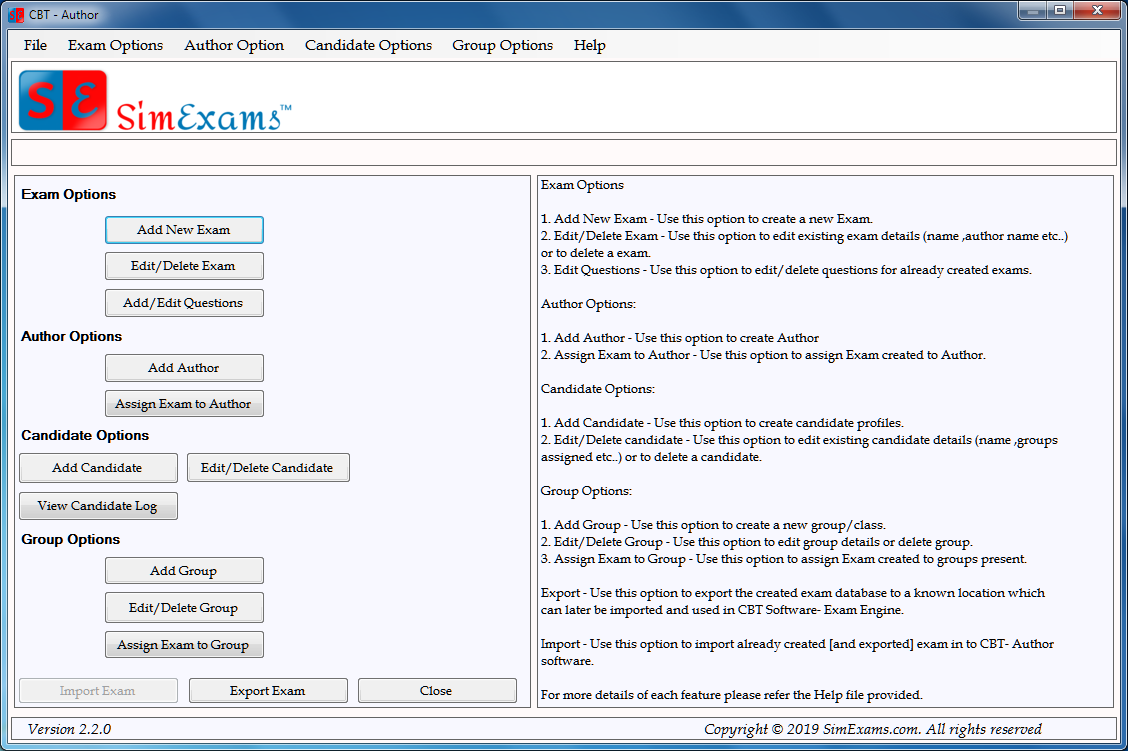
I. Authoring Options: The figure below shows the features available to an author. These include a) Exam Options, b) Author Options, c) Candidate Options, and d) Group Options. As may be seen in the screenshot, you will be able manage all said options.
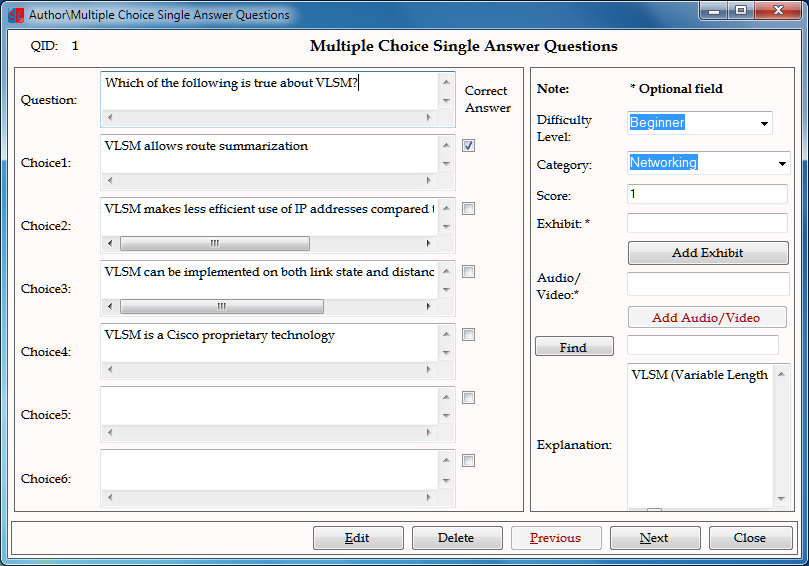
Author Question Input Screen: The screen shot below shows MCQ question input screen. There are several question types that may be used with the exam software, including MCQs, Drag-n-Drop, Hot Spot, etc.
III. Exam Engine Home Screen: The exam engine home screen is shown below. It shows available exam modules for the candidate. The candidate just needs to select one of the available exams and click on start to begin taking the exam.
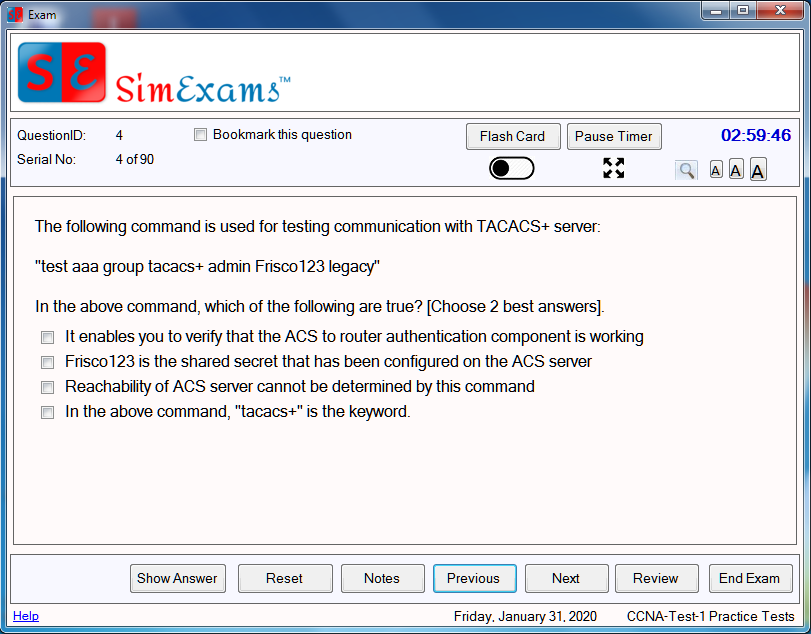
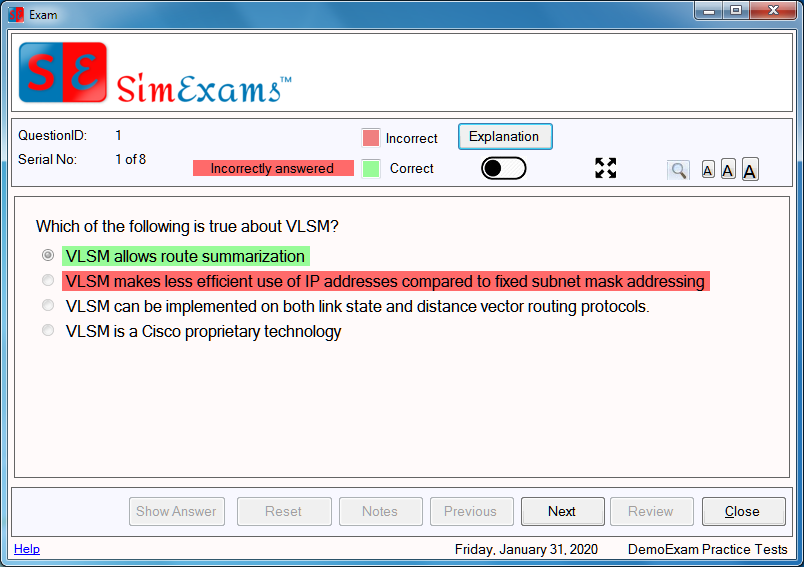
IV. Question Screen: An MCQ question type is shown below. Other question types are available. As may be seen from the screen shot, several features like Flash card, pause/restart timer, full screen mode and night mode are available among other things. Any of these features may be blocked by the author as per the requirements. For example, “Previous” navigation button may be disable, if required by the author.
V. Review Screen:
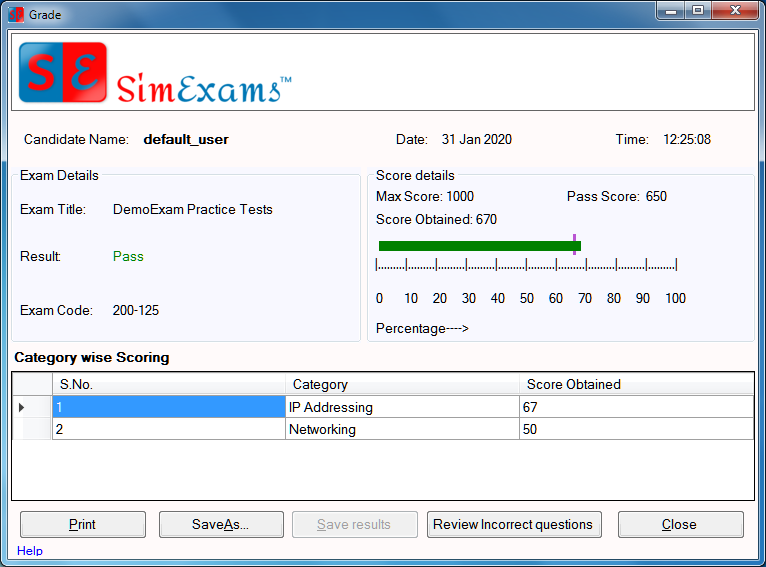
VI. Exam Results Screen: The screen shot below provides a brief view of exam results screen. As you can see, it provides the name of the candidate, result, pass score, and category wise scoring among other things.
In addition to the above, detailed web stats are available on exam results, wherein, you can see individual candidate exam results or compare the groups results and sort the candidates in ranking order.
Check out the trial version of the exam software and email us for more information.
The CBT (Computer Based Test) software has been updated recently to the cloud platform, wherein, all the tests are administered via web app. The advantage of using the cloud platform is that one can access and administer the author and exam software from a central location. We are still providing the off-line version of the software for those who require local environment (site local).
Various features of the software include the following
Multiple choice single answer (MCQA) and Multi Answer (MCMA)
Drag-n-drop (Image and Text) : Text Drag and Drop can be used for interactive Match the Following type questions, where as Image Drag and Drop allows to identify multiple components on the image provided in questions.
Hot spot type: here the candidate needs to identify the correct spot/component on an exhibit
Fill in the blanks: In this type of question candidate is given a phrase ,sentence or paragraph with one or more blank spaces. Candidate must type correct answers in provided blank spaces to complete the phrase ,sentence or paragraph.
Testlet type: Here the candidate needs to answer two or more questions after reading a passage or a scenario.
This website uses cookies to improve your experience while you navigate through the website. Out of these, the cookies that are categorized as necessary are stored on your browser as they are essential for the working of basic functionalities of the website. We also use third-party cookies that help us analyze and understand how you use this website. These cookies will be stored in your browser only with your consent. You also have the option to opt-out of these cookies. But opting out of some of these cookies may affect your browsing experience.
Necessary cookies are absolutely essential for the website to function properly. These cookies ensure basic functionalities and security features of the website, anonymously.
Cookie
Duration
Description
cookielawinfo-checkbox-analytics
11 months
This cookie is set by GDPR Cookie Consent plugin. The cookie is used to store the user consent for the cookies in the category "Analytics".
cookielawinfo-checkbox-functional
11 months
The cookie is set by GDPR cookie consent to record the user consent for the cookies in the category "Functional".
cookielawinfo-checkbox-necessary
11 months
This cookie is set by GDPR Cookie Consent plugin. The cookies is used to store the user consent for the cookies in the category "Necessary".
cookielawinfo-checkbox-others
11 months
This cookie is set by GDPR Cookie Consent plugin. The cookie is used to store the user consent for the cookies in the category "Other.
cookielawinfo-checkbox-performance
11 months
This cookie is set by GDPR Cookie Consent plugin. The cookie is used to store the user consent for the cookies in the category "Performance".
viewed_cookie_policy
11 months
The cookie is set by the GDPR Cookie Consent plugin and is used to store whether or not user has consented to the use of cookies. It does not store any personal data.
Functional cookies help to perform certain functionalities like sharing the content of the website on social media platforms, collect feedbacks, and other third-party features.
Performance cookies are used to understand and analyze the key performance indexes of the website which helps in delivering a better user experience for the visitors.
Analytical cookies are used to understand how visitors interact with the website. These cookies help provide information on metrics the number of visitors, bounce rate, traffic source, etc.
Advertisement cookies are used to provide visitors with relevant ads and marketing campaigns. These cookies track visitors across websites and collect information to provide customized ads.