Simplify Exam Management with Advanced CBT Software

Pin It

Managing exam manually or with outdated tools can be time consuming and inefficient. Our Computer Based Test (CBT) software is built to modernize the way exams are created, delivered, and evaluated all from a single, centralized system.

Designed for educators, training institutes, and organizations, this solution ensures a smooth and scalable testing experience.

A Complete Testing Ecosystem
This CBT solution is not just an exam tool – it’s a complete ecosystem that integrates:

  • A powerful Authoring System for instructors
  • A dynamic Exam Engine for candidates
  • A centralized database for seamless collaboration

Multiple authors can work together while maintaining consistency and control over the question bank.

Smart Authoring Capabilities
Creating and managing exams becomes effortless with a wide range of administrative features:

  • Multi-user access with admin and author roles
  • Ability to create unlimited exams, candidates, and groups
  • Easy bulk upload of questions and student data via Excel
  • Flexible exam configuration settings
  • Secure backup and restore options
  • Topic-based question selection for customized exams

This makes it ideal for institutions handling large volumes of students and assessments.

Real Exam Experience for Candidates
The Exam Engine is designed to replicate real-world testing conditions while also supporting learning:

Exam Mode: A distraction-free environment with strict timing, just like an actual exam.

Learn Mode: Interactive mode with instant feedback, explanations, and flashcards.

Review Mode: Detailed post-exam analysis including answers, explanations, and performance tracking.

Customization at Every Level:
The software offers complete flexibility to instructors:

  • Set exam duration and question count
  • Choose between random or sequential question delivery
  • Enable or disable answer randomization
  • Allow pause functionality if needed
  • Enable bookmarking of important questions

This ensures every exam can be tailored to specific requirements.

Insightful Reports & Analytics:
Understanding performance is key to improvement. The CBT software provides:

  • Instant score calculation
  • Category-wise performance breakdown
  • Time spent per question analysis
  • Exportable reports in PDF format

Platform Availability:
The CBT software is designed for wide accessibility:

  • Windows (8,10,11)
  • Mac
  • iOS
  • Android

Download Link:
For Windows click here 
For Mac click here
iOS click here
Android click here

Simexams.com Computer Based Test Software Update

Pin It

Simexams.com recently updated it’s Computer Based Test software to support remote proctoring. Remote proctoring enables candidates to write an exam from the comfort of home or any location with network access to user’s computer. It enables organizations to conduct an exam remotely and observe the candidate for any fraud or cheating during the exam.

The software includes several features, including Online/Offline mode (in off-line mode, remote proctoring is not supported), exam configuration, authoring, and centralized reporting and exam delivery.

Unlike most of the CBT softwares which work from browser window, the simexams.com software uses client software and server software (Client-Server/Peer model). The advantages of using installable software include betteer security, endurance against short Internet connectivity problems, and storage of results in local database in addition to server side storage. It also solves the frequent problems encountered with browser incompatibility.

You may download free trial version of the Computer Based Testing Software from the website, and try the same.


Simexams.com Exam Software with Authoring Tool – Web Version

Pin It

SimExamsSimexams.com, leading exam software developer, recently released web  version of it’s examination software with authoring tool. The software works in conjunction with web and uses advanced authoring software. Given below are the important features of the authoring software:

  • Create any number of exams with any number of questions.
  • Add and Remove any number of candidates and assign them to different groups.
  • Assign questions to different categories or topics.
  • Full control to configure exam parameters like number of questions per exam, exam time, pass percentage, allowed exam modes and permitted buttons.
  • Support different question types including Multiple choice single answer and Multi Answer, image, audio and video.
  • Preview questions to see how they are presented to candidates.
  • Export exams for distribution.

Most importantly, the exam software works offline and integrated with the web for dynamic exam module download and upload of exam results. Detailed stats are available for analysis of results. Granular management of features offered by the exam engine by the test author allows rendering the exam as required.

Some screenshots of the exam software are provided below:
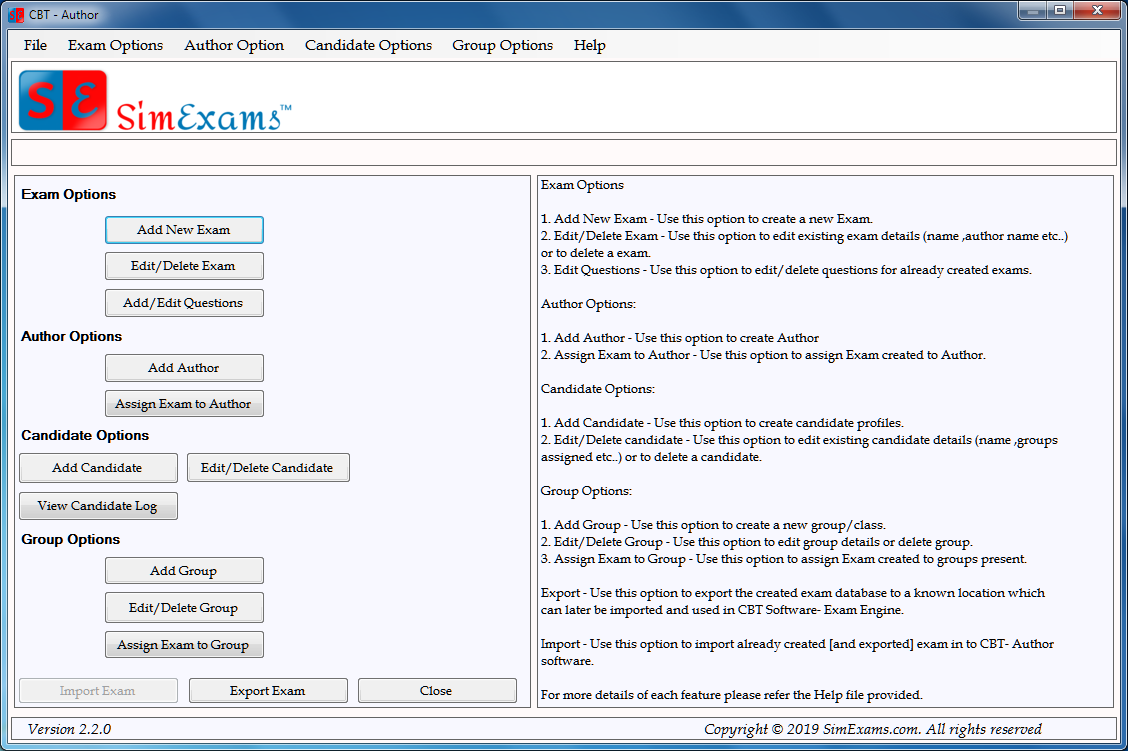
I. Authoring Options: The figure below shows the features available to an author. These include a) Exam Options, b) Author Options, c) Candidate Options, and d) Group Options. As may be seen in the screenshot, you will be able manage all said options.

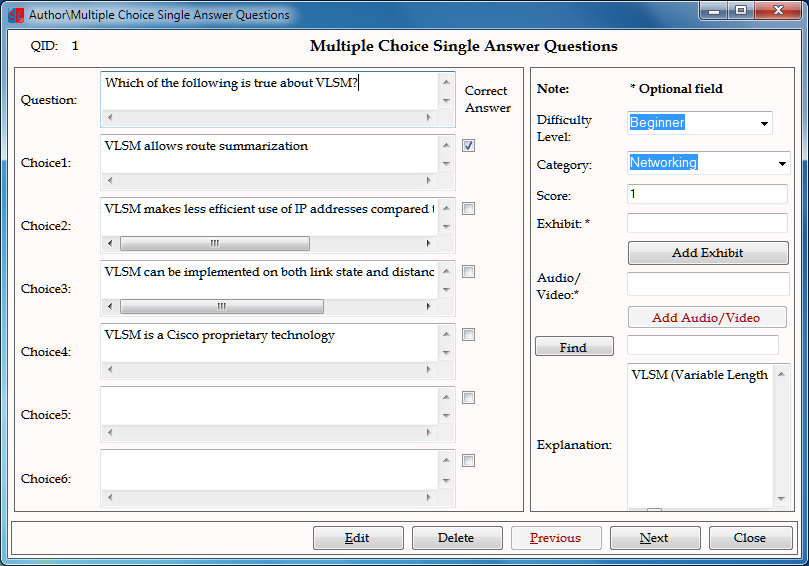
Author Question Input Screen: The screen shot below shows MCQ question input screen. There are several question types that may be used with the exam software, including MCQs, Drag-n-Drop, Hot Spot, etc.

Exam Software Question Input

III. Exam Engine Home Screen: The exam engine home screen is shown below. It shows available exam modules for the candidate. The candidate just needs to select one of the available exams and click on start to begin taking the exam.

Exam Engine Home Screen

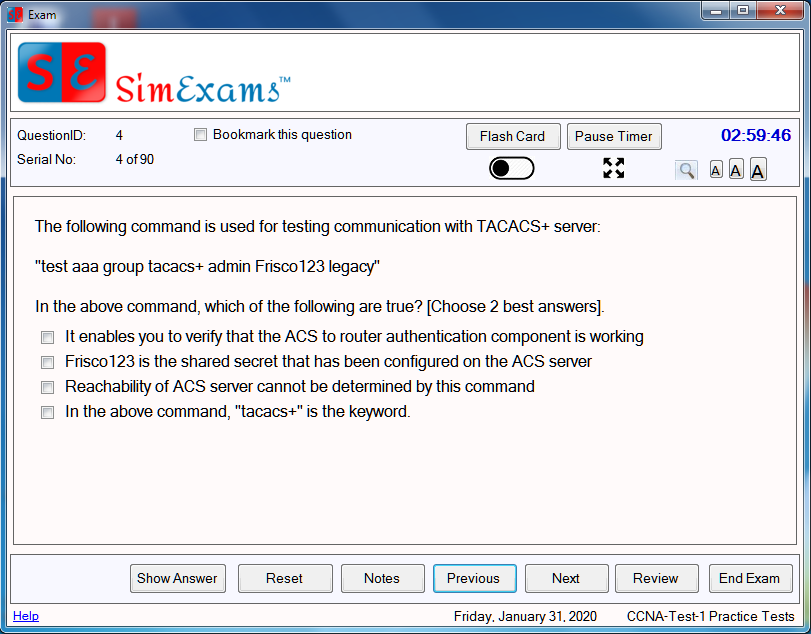
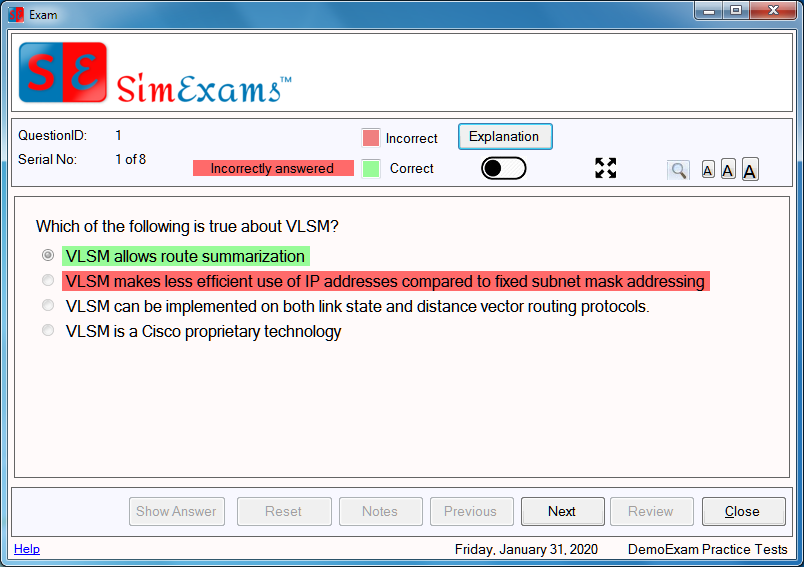
IV. Question Screen: An MCQ question type is shown below. Other question types are available. As may be seen from the screen shot, several features like Flash card, pause/restart timer, full screen mode and night mode are available among other things. Any of these features may be blocked by the author as per the requirements. For example, “Previous” navigation button may be disable, if required by the author.

Exam Engine - Questions

V. Review Screen:

Exam Review Screen

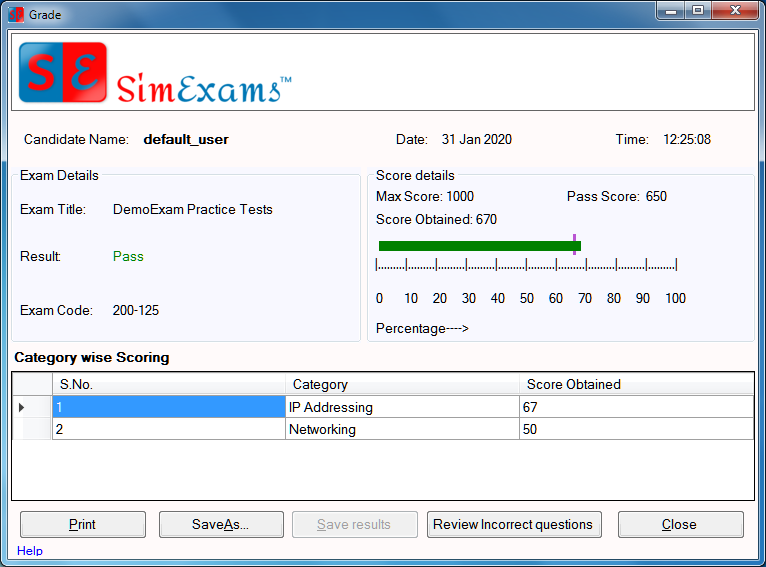
VI. Exam Results Screen: The screen shot below provides a brief view of exam results screen. As you can see, it provides the name of the candidate, result, pass score, and category wise scoring among other things.

exam results

In addition to the above, detailed web stats are available on exam results, wherein, you can see individual candidate exam results or compare the groups results and sort the candidates in ranking order.

Check out the trial version of the exam software and email us for more information.

SimExams.com Website Launched

Pin It

SimExamsAnand Software and Training launched long awaited website SimExams.com, a website offering solution to student evaluation, ranking, and assessment. The two main components of the assessment solution are,

  1. Author Software, and
  2. Exam Software

The author software provides a platform, wherein, an author can develop content as required by the course that he/she is taking. The question types include multiple choice, drag n drop, hot spot (identify the correct component in a motherboard, etc), and media type questions. Once the question database is ready, the exam may be administered to the students in a classroom setup or in home setup. Results are available on the web and it is possible to compare and rank students.

The exam software is compatible with desktop Windows computers, and mobile devices. Check out the website for more information.