Sim-Ex A+ Core 2 Practice Exams for iOS

Pin It

SimulationExams.com provides the Sim-Ex Practice Exams iOS application for candidates preparing for the CompTIA A+ Core 2 certification exam.

The application is developed to help users practice important exam topics through interactive questions and exam simulation features. With over 350+ practice questions included, users can improve both technical knowledge and exam confidence.

Key Features of the Application

Multiple Question Types
The software supports several question formats similar to the actual certification exam, including:

  • Multiple Choice – Single Answer
  • Multiple Choice – Multiple Answers
  • Text – Based Drag and Drop
  • Image – Based Drag and Drop

Learn and Practice Efficiently

Learn Mode: Each questions includes a detailed explanation that helps users understand the concept behind the correct answer.

Exam Mode: The application creates a real exam-like environment to help candidates practice under timed conditions and improve preparation levels.

Additional Functionalities

  • Save exam result
  • Review previously answered questions
  • User-friendly interface
  • Smooth navigation experience

Device Support
The iOS application is compatible with:

  • iPhone
  • iPad
  • iPod Touch

iOS Application Update in Progress:
The updated version of the iOS application is currently under progress. New enhancements and feature updates will be released soon.

Users who wish to continue their preparation on computers can download and use the desktop version of the exam software from SimulationExams.com

Sim-Ex Practice Exams continue to support certification aspirants with effective practice tools and exam-oriented preparation materials

click here to download current version for iOS

Sim-Ex A+ Core 1 iOS App updated with Latest Certification Syllabus

Pin It

Technology is constantly evolving, and certification exams are updated regularly to match the latest industry standards. To help students stay current with these changes, SimulationExams.com is updating the Sim-Ex Practice Exams application for the latest CompTIA A+ Core 1 syllabus on iOS devices.

The updated version is designed to provide students and IT professionals with improved study materials, enhanced practice questions, and a more effective mobile learning experience for the newest A+ Core 1 certification objectives.

Why the Update is Important.
Certification exams are frequently revised to include the latest technologies, troubleshooting methods, hardware standards, networking concepts, and security practices.

To ensure candidates prepare with the most relevant content, the Sim-Ex iOS application is being upgraded to align with the newest A+ Core 1 syllabus. This helps students focus on current exam objectives and industry-relevant skills.

Enhanced Practice Question Database:
The updated application includes refreshed and expanded practice questions covering important topics from latest syllabus.

Key areas include:

  • Mobile devices
  • Computer hardware
  • Networking technologies
  • Cloud computing
  • Virtualization
  • Troubleshooting procedures
  • Security fundamentals

The goal is to help users gain stronger technical knowledge while preparing for the real certification exam.

Improved Interactive Learning Experience:
The application continues to support multiple interactive question formats that creates a realistic exam environment.

Supported Question Types:

  • Multiple choice single answer
  • Multiple choice multiple answer
  • Text-based drag and drop
  • Image-based drag and drop

These question formats help candidates improve problem-solving skills and become familiar with the actual certification exam structure.

The Learn Mode has also been improved to provide better explanations and concept clarity for every question.

User can:

  • Understand technical concepts more effectively
  • Learn from incorrect answers
  • Build confidence gradually
  • Strengthen troubleshooting knowledg

This makes the app useful not only for exam preparation but also for improving practical IT understanding.

Realistic Exam Simulation:
The updated Exam Mode is designed to simulate the latest certification testing environment.

  • Timed exams
  • Question review
  • Result saving
  • Performance analysis

This realistic approach helps candidates practice under exam conditions and improve time management skills before taking the actual certification test.

Optimized for Modern iOS Devices:
The updated application is optimized for modern versions of iOS and tested across supported iPhone devices to ensure smooth performance, stability, and better user experience.

Supporting Students with Modern Learning Tools:
Mobile learning has become one of the most convenient ways for students to prepare for certifications. With the updated Sim-Ex iOS application, users can continue studying anytime and anywhere directly from their smartphones.

The application combines portability, interactive learning, and real exam simulation into a single platform for effective certification preparation

Conclusion:
The updated Sim-Ex Practice Exams for the latest A+ Core 1 syllabus reflects the commitment to providing high-quality and up-to-date certification preparation tools for student sand IT professionals.

With refreshed content, improved learning features, realistic exam practice, and enhanced mobile support, the new version aims to deliver a better and more effective learning experience for candidates preparing for the latest A+ Core 1 certification exam.

Download available version of Aplus Core 1 for iOS

iOS Apps For Cisco CCENT, and CCNA Revised

Pin It

Anand SoftwareAnand Software recently revised it’s iOS apps for several exam sims. The important updates to the iOS apps include the following:

– New questions added
– Randomising questions in learn mode.
– Night mode and full screen option while taking exam.
– Bookmarking questions learn mode and exam mode.
– Option to retake bookmarked, unanswered or incorrect questions while
taking exam.
– Improved flash cards with support for images.
– Exam configuration (changing exam time and number of questions per exam)

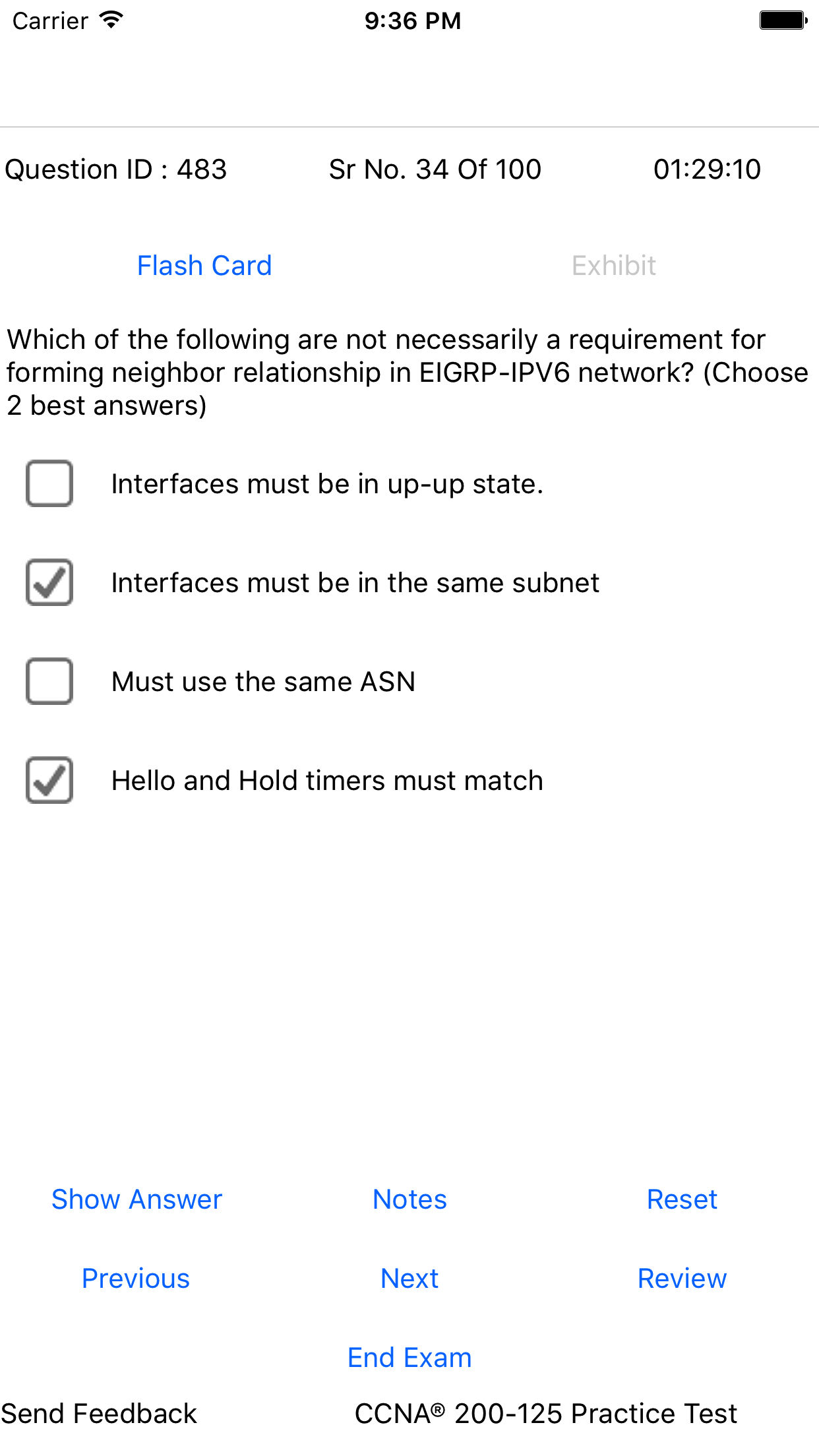
Few of the features are showing in the screenshots below:

    1. Exam - MCQsThe screen displays a Multiple Choice Multi Answer question type.  Two modes are available, one is Learn Mode and the other is Exam Mode. The display pertains to Learn Mode and contains Question ID (unique to each question and used for providing feedback on the question), Flash Card, Exhibit (option), question and answers. The navigation buttons include Show Answer, Notes (which you can enter for future review), Reset (resets the selected answers, Previous, Next, Review (We will see this screen later), and End Exam. The option Send Feedback provides a means to the candidate to seamlessly provide feedback to the author about the specific question without leaving the exam environment.  Feedback, particularly about any errors in the question or flash card is considered immediately. Exam mode is very similar to Learn mode except for a fixed time timer, and the absence of a few options like Show Answer.
    2. Review Exam

exam questions reviewThe exhibit displays the Review screen of the exam questions. As may be seen, candidates have the option to review 1) Bookmarked questions only, 2) Incorrect questions only, 3) Un-answered questions only. These options allow us to review only intended questions and save time and effort in preparing for exam. The question ID is unique and needs to be quoted when reporting any inconsistency or mistake in any given question. We will see a few more such screenshots below.

Review Question Screen: Given below is the question-answer screenshot in questions review mode.

3. Review Question
The display corresponds to a wrongly answered question. In this example, there are a total of 10 wrongly answered questions. The displayed question ID i 510. If you click on the Explanation, a brief explanation is presented on the displayed question. Right answers are indicated by Green high-light and wrong answers by Red color. Other options in the Nav bar are as usual.

4. Flash card Screen:

This screen corresponds to the Flash card of Question ID 510. The flash cards provide detailed explanation of the answers as well as the topic concerned.

Check out the iOS apps for iPhone on Apple iTunes store. The products are available in Free and Full versions. Free version is limited to 60 questions whereas the Full version contains 300+ questions (varies depending on the exam). Check out the following links for more info and free download:

There are several more apps available for CCNP, CCENT, Comptia A+, Juniper JNCIA, and others. Check them out at AnandSoft iTunes Apps Store.